EN
+7 (917) 274-98-10Discuss a pilot

Platform

Flatstack Corporate AI

Every employee gets an AI assistant, and data never leaves the agreed perimeter. The assistant answers from internal documents and helps with emails, contracts and reports, while agents carry out tasks in your CRM and 1C within the permissions you set.

Company perimeter · works offline

Employeesweb · iOS · Android

  1. Flatstack Corporate AIchat · API · agents · knowledge · vault
  2. Company systemsCRM · 1C · email · documents
  3. Infrastructureyour GPU servers or Flatstack infrastructure

Outboundpublic AI APIsno connection

Interfaces

Where employees work with AI

Web chat

Conversations, files, answers with source links and access to agents — in the browser, with nothing to install.

Mobile apps

iOS and Android with shared chat history: ask on the go and get an answer based on company policy, with a link.

API

Connects AI to portals, CRM and internal apps. Every answer comes with its sources.

Agents

Work in company systems within the permissions you set. Where needed, an employee confirms the action.

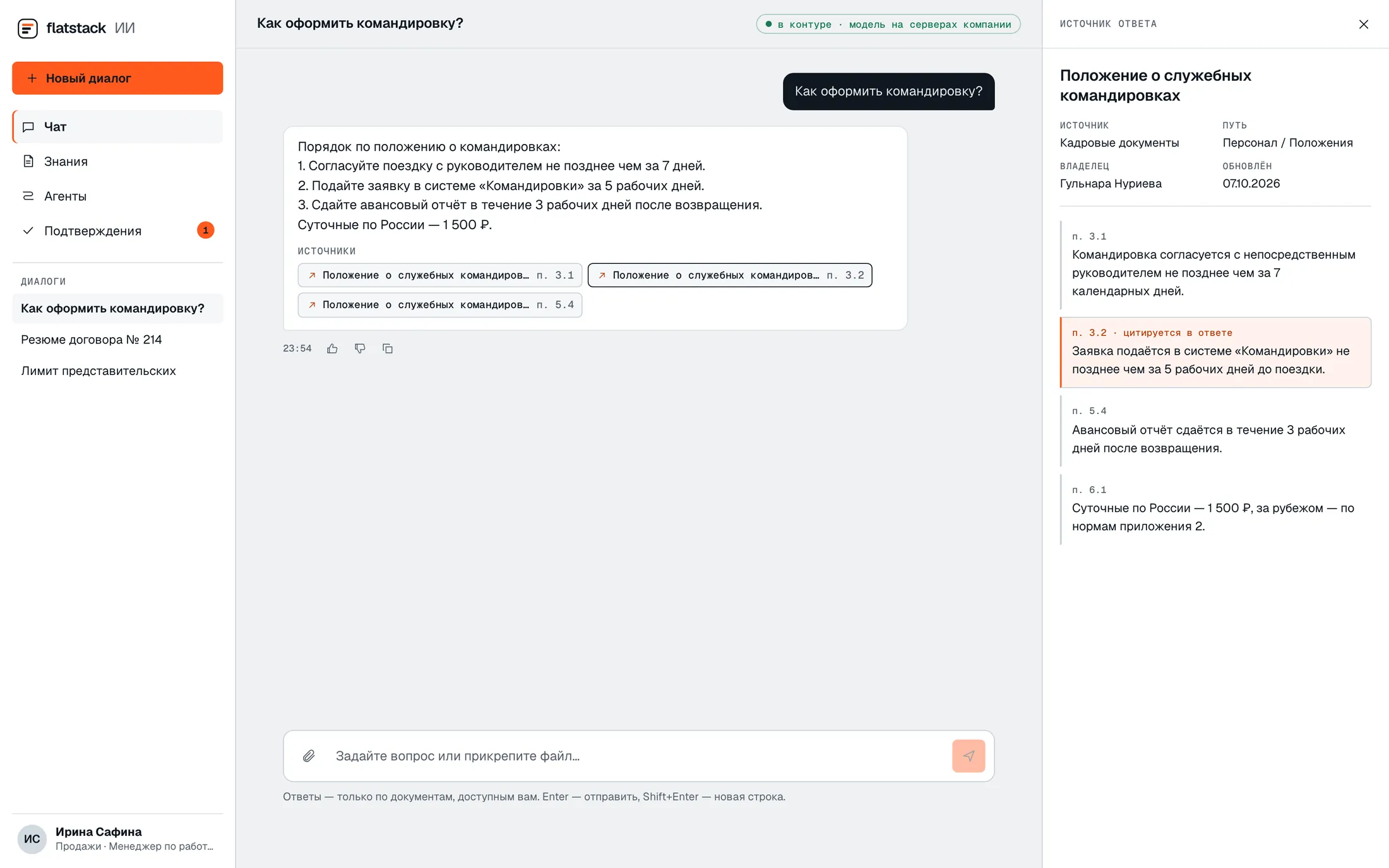
Web chat: an answer about business trips with links to clauses of the policy; clause 3.2 of the source document is open on the right
An answer with links to document clauses. A click on a link opens the clause itself.
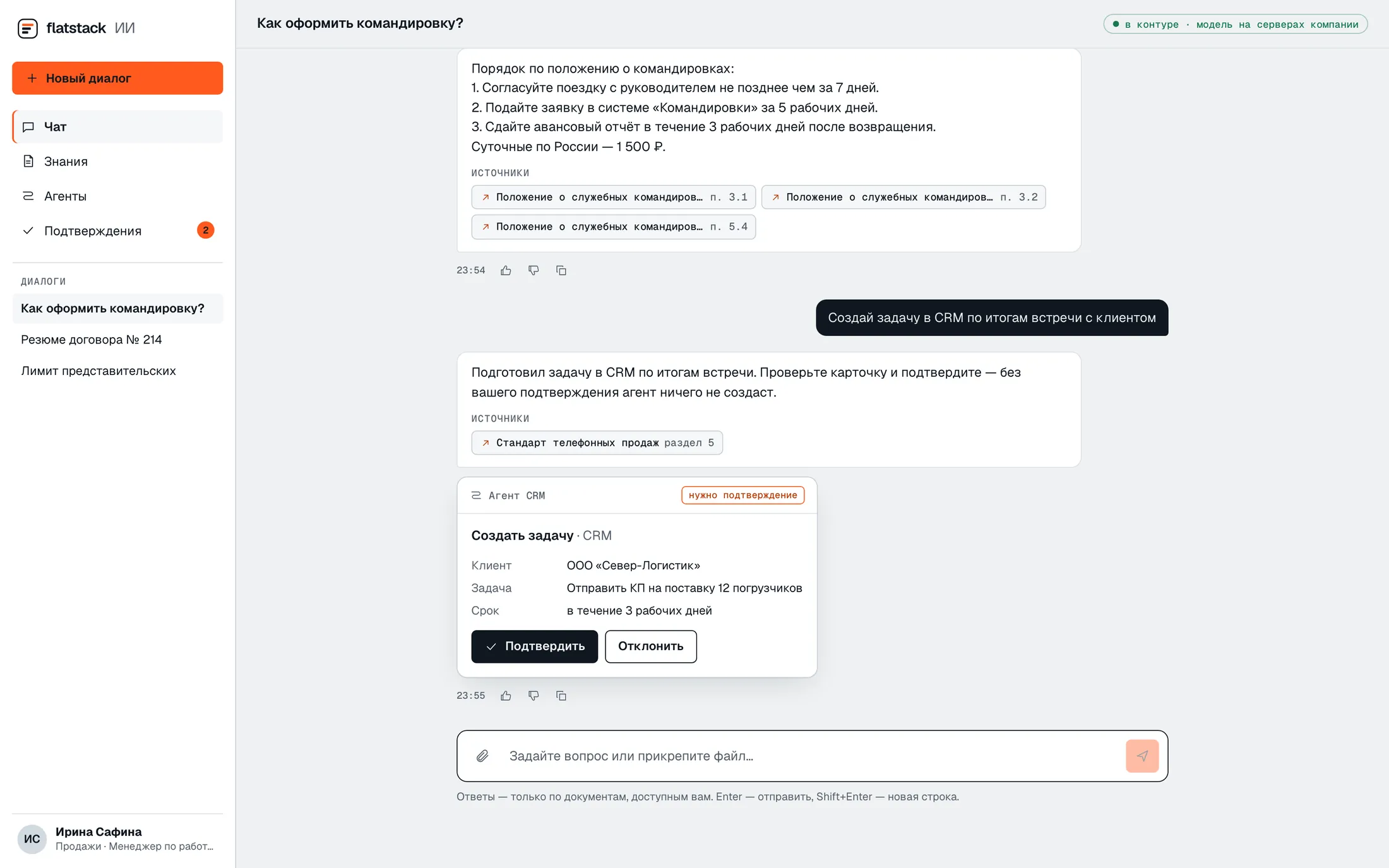
Web chat: the CRM agent has prepared a task and waits for approval — a card with parameters and Approve and Reject buttons
The agent has prepared an action in the CRM. It will not run until an employee approves it.

iOS and Android: the assistant and approvals in your pocket

The same conversation history, answers with sources and approval of agent actions — from the phone. Distributed via corporate MDM; answers are not stored on the device after logout.

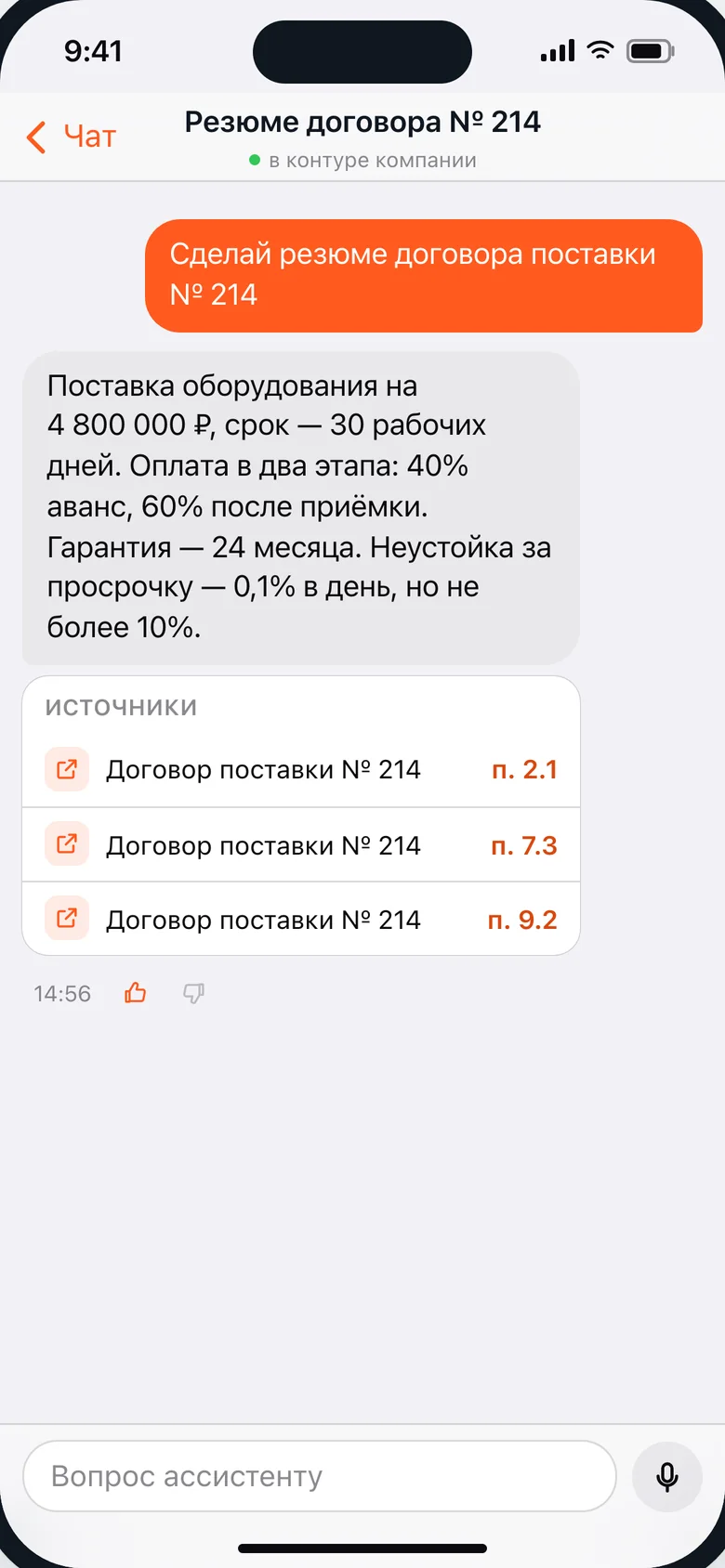
  • Mobile app: a summary of a supply contract with links to clauses 2.1, 7.3 and 9.2
    An answer with links to contract clauses
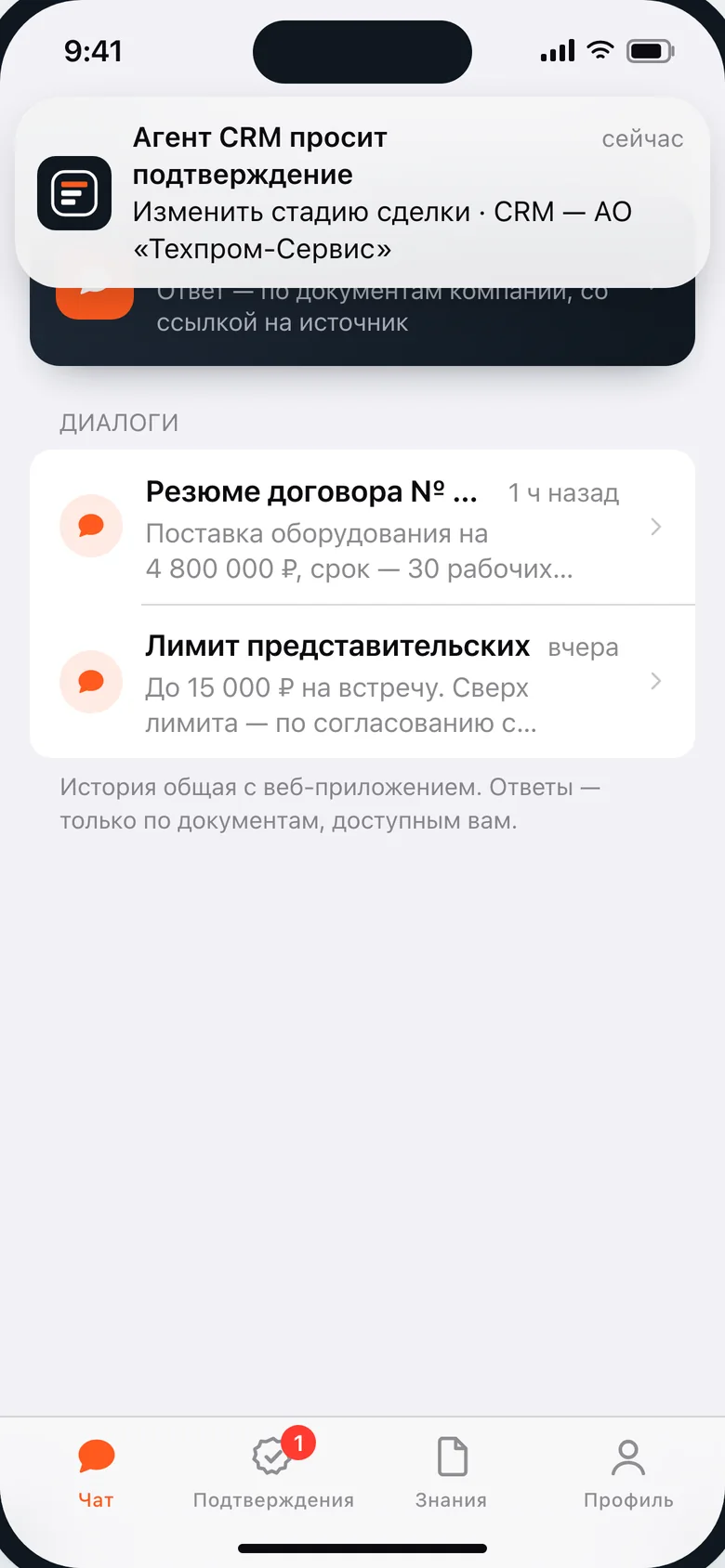
  • Mobile app: a push notification “CRM agent requests approval” over the conversation list
    A push when the agent needs a decision
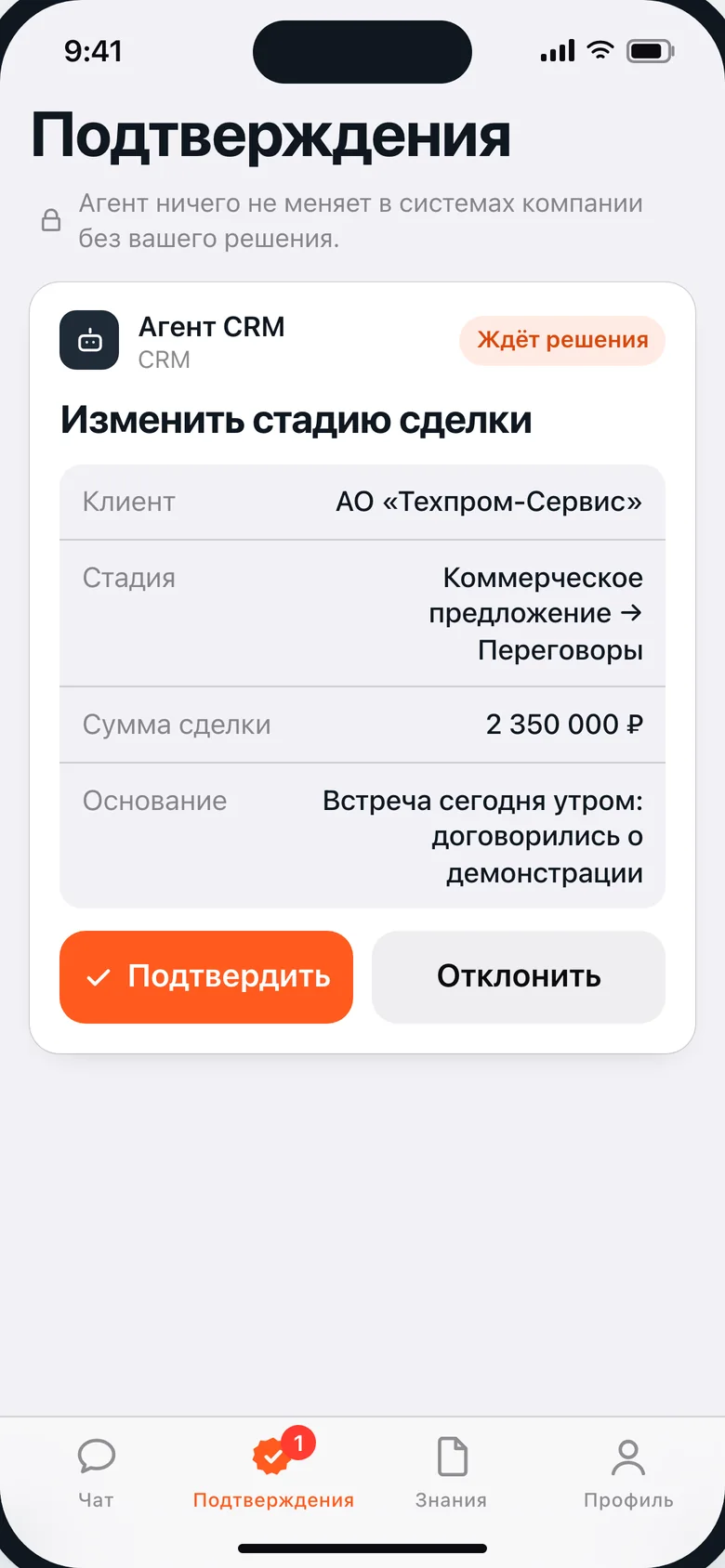
  • Mobile app: the CRM agent action card “Change deal stage” with Approve and Reject buttons
    Approval in one tap
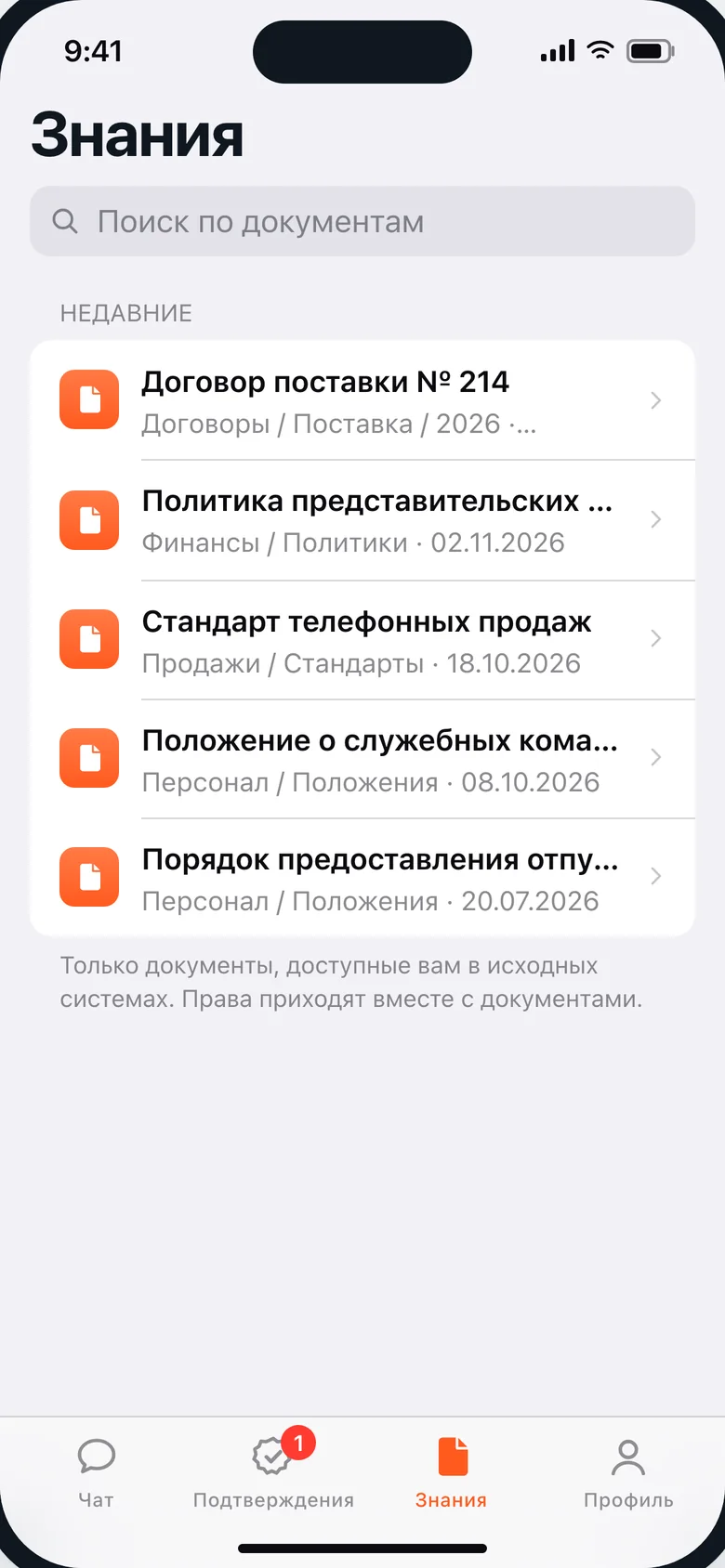
  • Mobile app: search across documents available to the employee and recent documents
    Documents available to the employee

Web, phone and back office share the same data: an approval on the phone appears in the back-office audit log at once. Interface shown in Russian. The company, employees and documents on the screens are fictional.

Modules

What’s inside

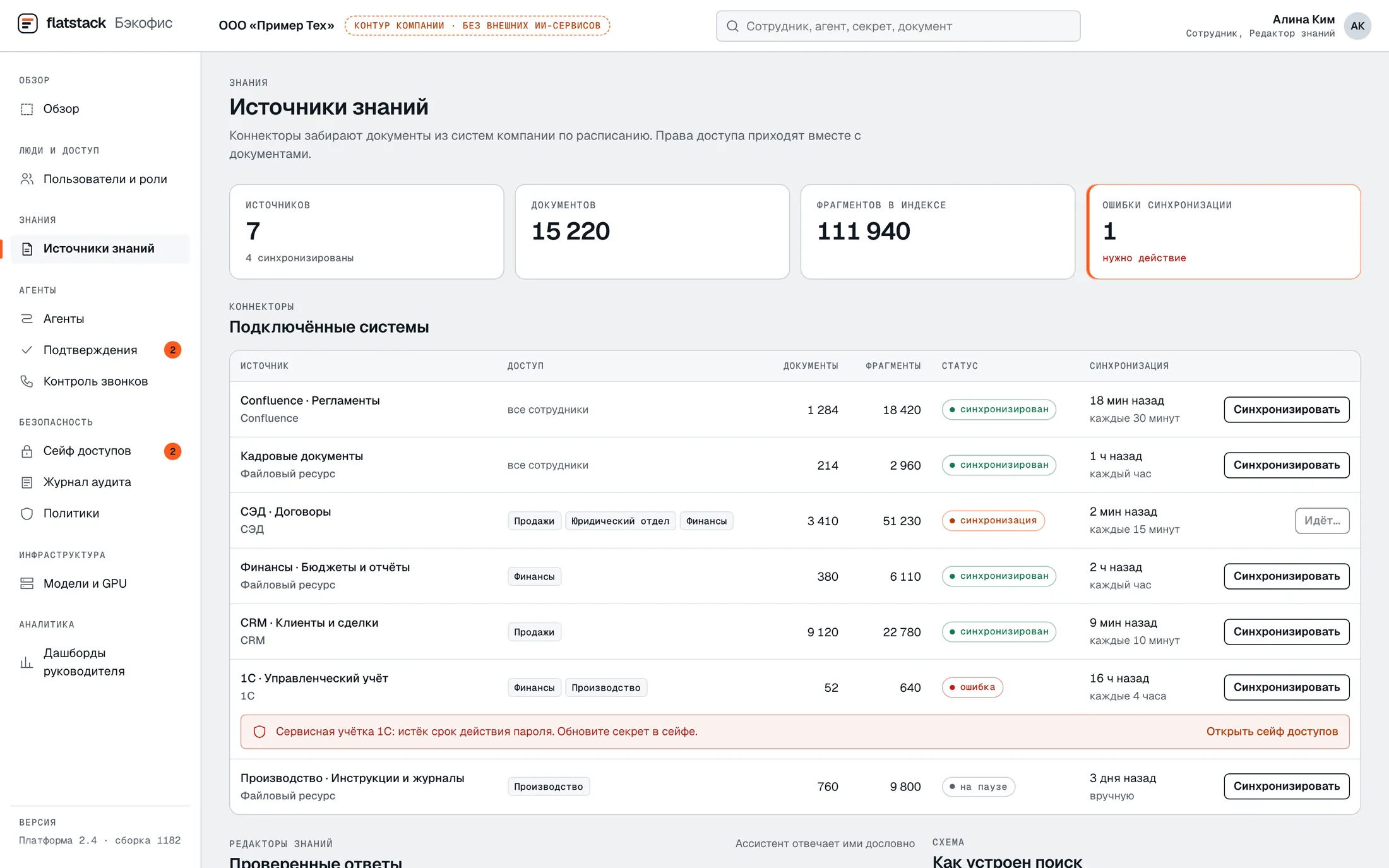
Back office, knowledge sources: connected systems, document and chunk counts, sync status and a 1C service account error

Knowledge

Answers from company documents with a link to the source, respecting access rights.

Connects to Confluence, file storage and CRM and re-indexes changes on its own. Grows with answers verified by experts — without fine-tuning the model.

“What’s the limit on entertainment expenses?” → “Up to RUB 15,000; anything above needs approval” + a link to the expense policy, clause 5.
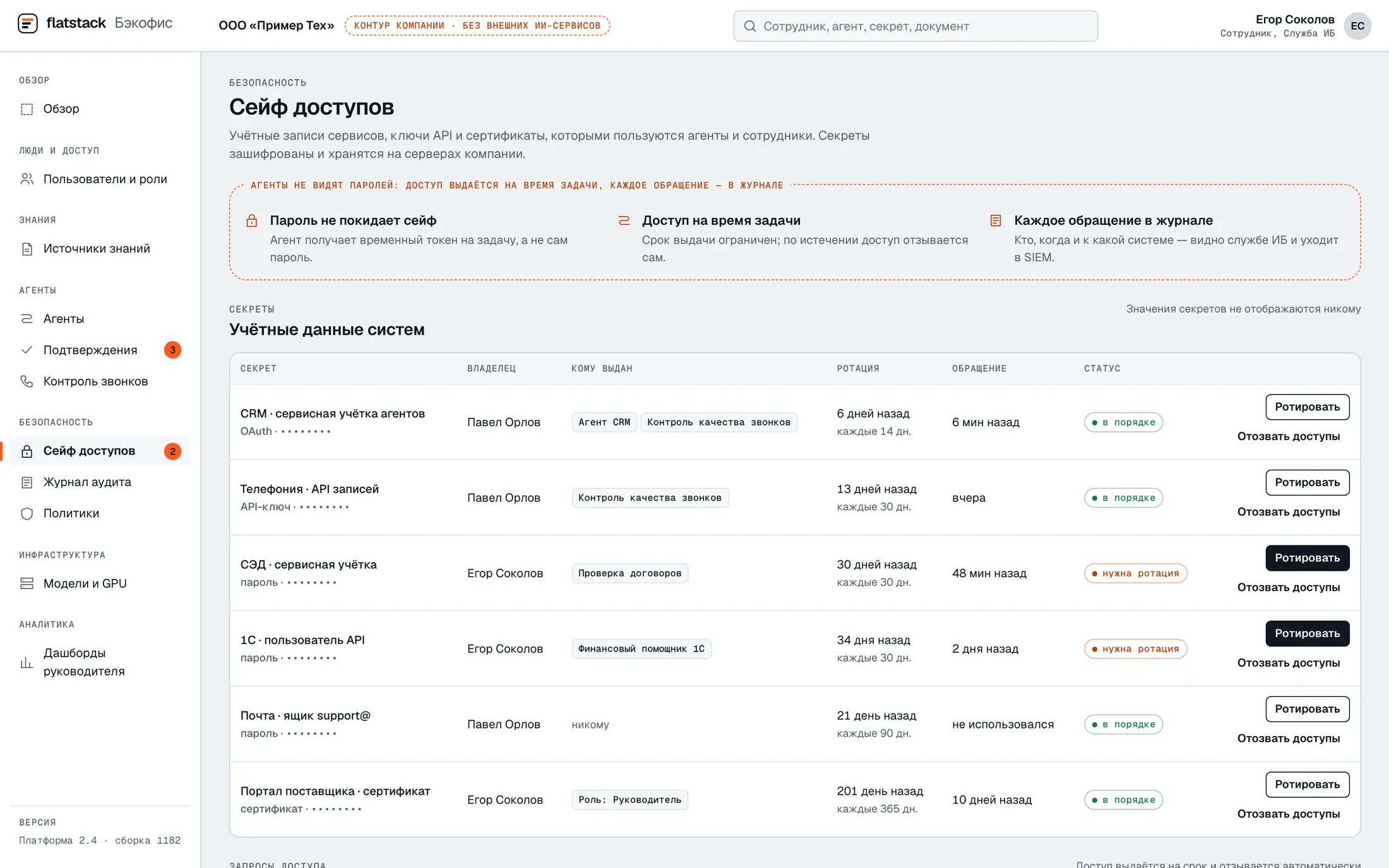
Back office, access vault: system credentials, owner, who has access, rotation period, Rotate and Revoke access buttons

Access Vault

Stores the passwords, keys and certificates that agents use to sign in to systems.

Role-based access with approval, rotation, revocation and an access log. Passwords never appear in requests to the model.

The CRM agent gets a service account for the duration of a task; credentials rotate every 14 days.

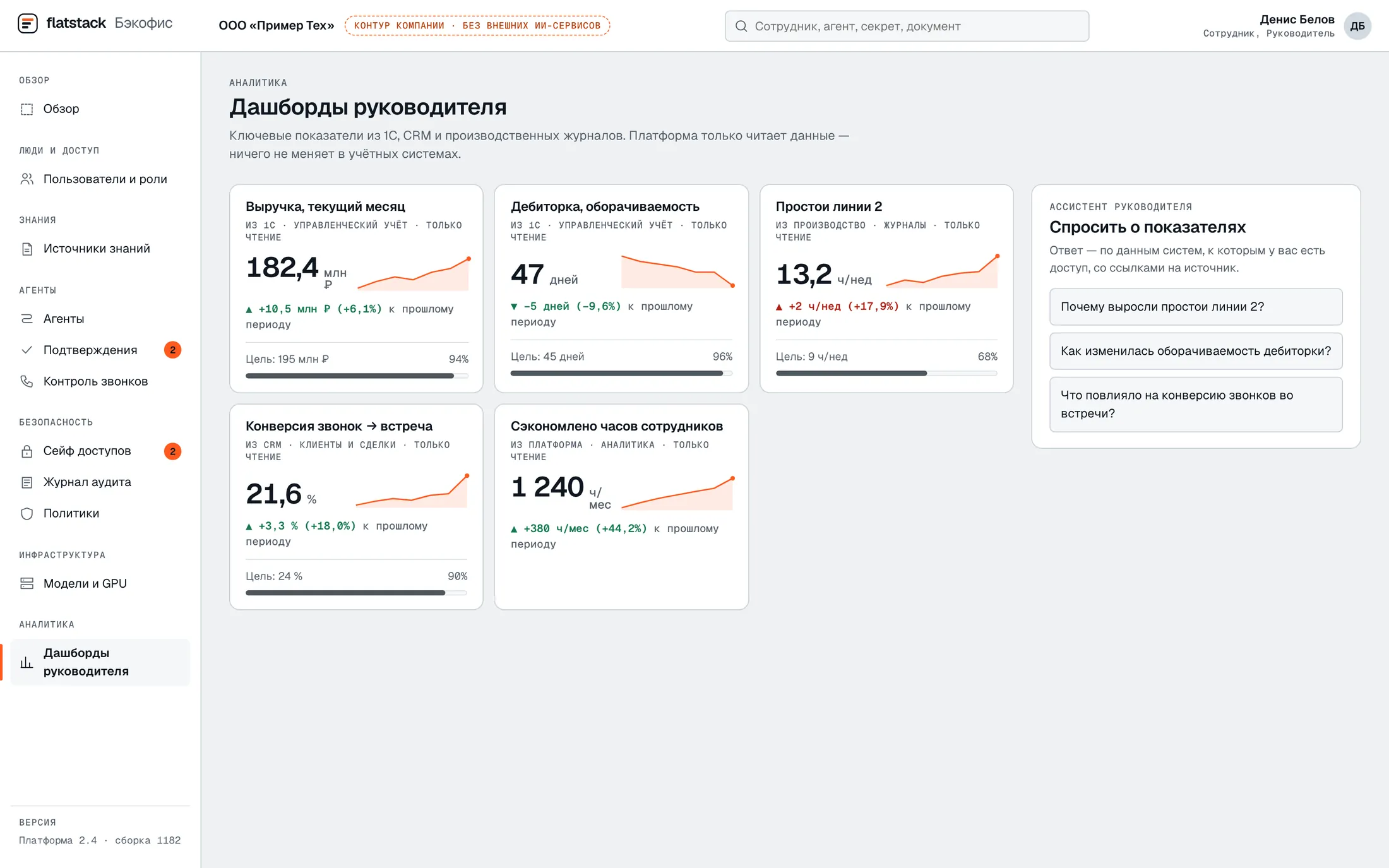
Back office, executive dashboards: revenue, receivables, line downtime, call conversion and an assistant for questions about the figures

Dashboards

Management metrics from your accounting systems, with answers to questions about them in plain language.

Read-only connections to sources; drill-down from a summary figure to the underlying data; alerts on deviations.

“Why did downtime increase in Q2?” → a breakdown by workshop and shift.

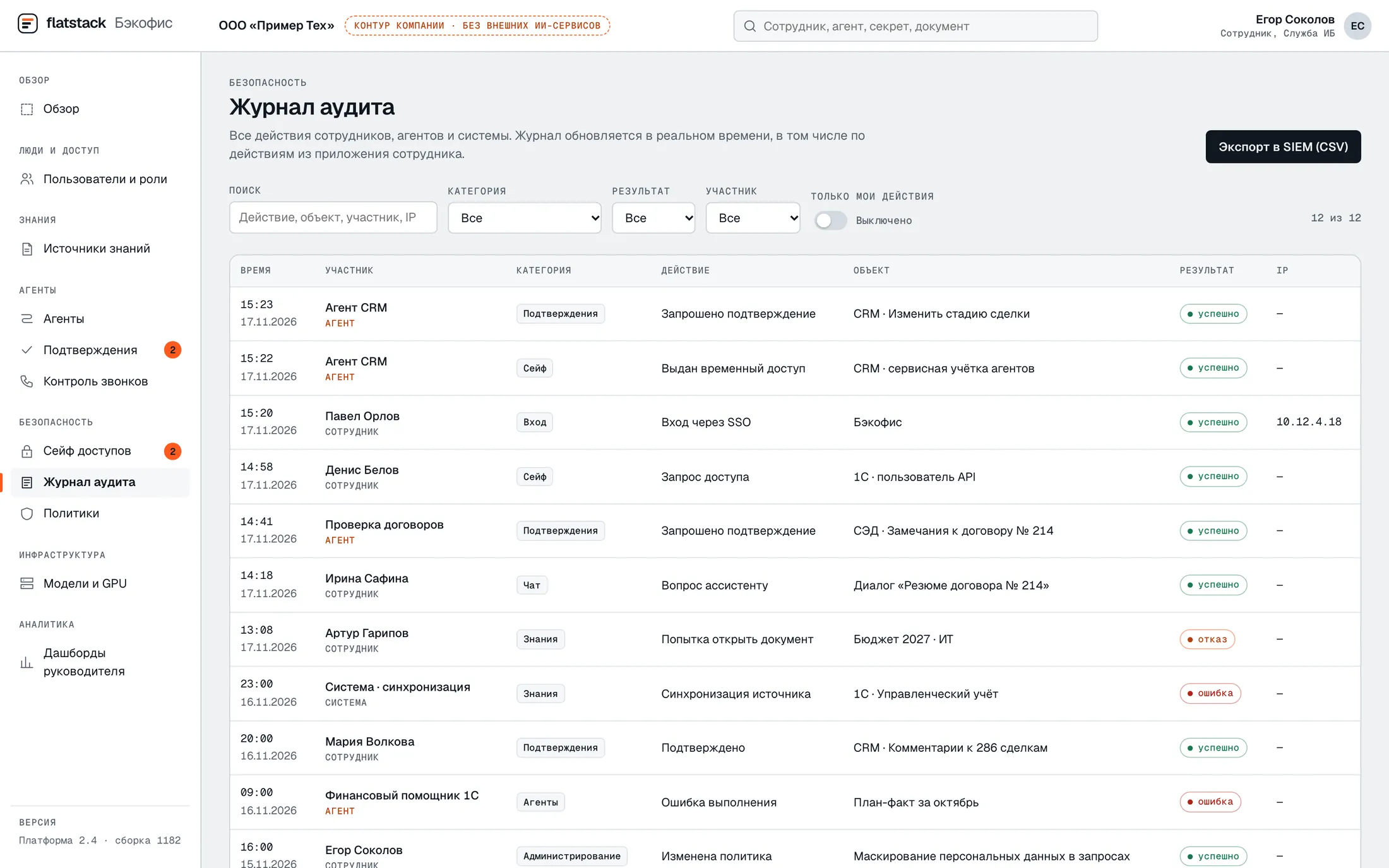
Back office, audit log: SSO login, temporary access issued to an agent, approvals, a denied document request, export to SIEM

Administration & Audit

Management of users, roles and rules for using AI.

Sign-in via AD/LDAP or SSO, MFA, a log of user and agent actions, retention periods, load monitoring.

IT sees who uses which use cases and switches off what isn’t needed.

Architecture

Platform layers and the request path

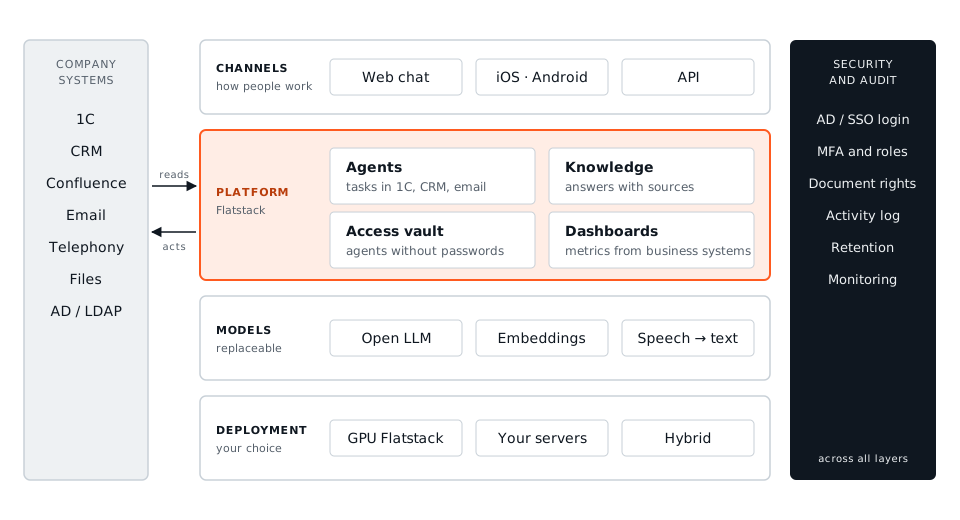
Every component runs inside the agreed perimeter. Models sit behind a single internal API, so they can be replaced without reworking the chat, agents or integrations.

Platform layers: channels; the platform with agents, knowledge, access vault and dashboards; replaceable models; deployment of your choice. Company systems on the left, security and audit across all layers on the right.
Channels, platform, models and deployment. Security and audit run across all layers.
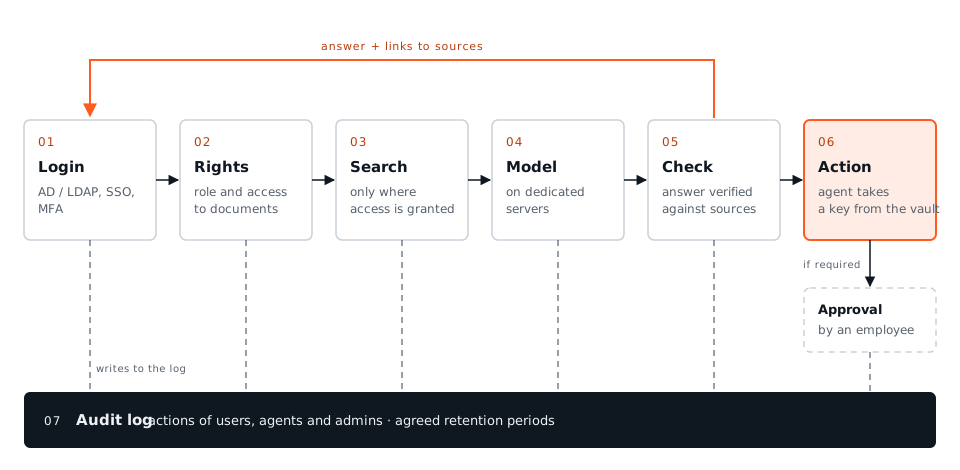
Request path: login, permission check, search in accessible documents, model on dedicated servers, verification against sources, agent action through the vault with approval; every step is written to the audit log.
Seven control points for every question, from login to the audit log.

What it is made of

Gateway and login

One entry point for web, mobile apps and API: login via AD/LDAP and SSO, roles, limits, streamed answers.

Knowledge search

Hybrid search by meaning and by words. Document permissions are checked before a fragment reaches the model.

Agents

Run tools in company systems. An action marked “approval required” is blocked until an employee decides.

Access vault

Passwords and keys of systems. An agent gets temporary access for a task; rotation and revocation follow security rules.

Personal data masking

Personal data in requests is replaced before the model and restored in the answer after it.

Audit log

An immutable log of actions by people and agents, exported to SIEM. Conversation texts never go into the log.

Models

Any open model

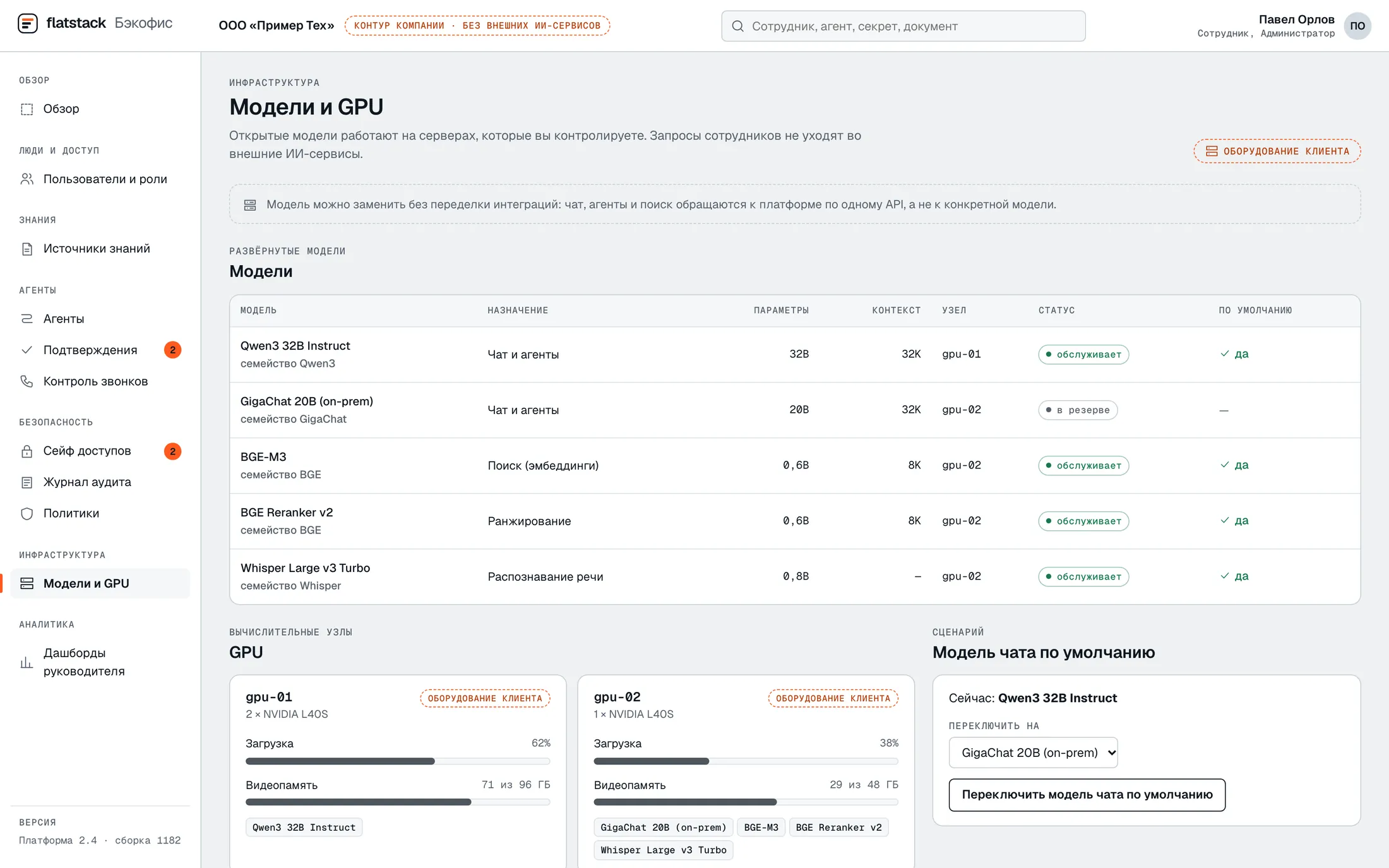
We choose the model based on your tasks, the available hardware and how well it handles the language you need. The pilot checks the choice against real work.

  • The model runs on dedicated hardware — no public AI APIs.
  • The model can be replaced without reworking integrations.
  • The model is not fine-tuned on your data: the knowledge base grows with verified answers.
Back office, models and GPUs: deployed open models, their purpose, GPU load and switching the default chat model
Models and GPUs: open models on your servers, GPU load, model replacement without reworking integrations.

Where it runs

Your hardware, our infrastructure or any other setup

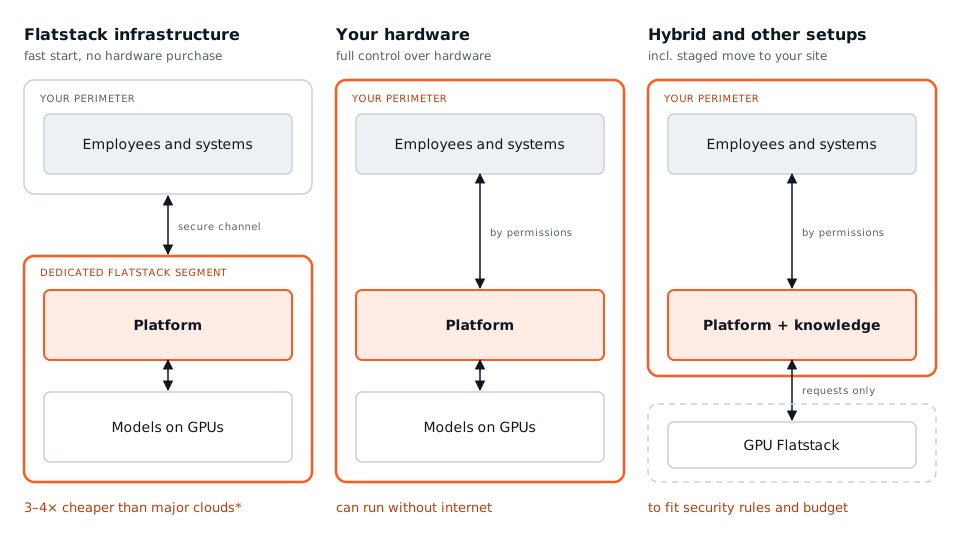
Flatstack infrastructure is 3–4× cheaper than major cloud providers*. On your hardware, the platform also runs without internet access.

Deployment options →

Three deployment options: Flatstack infrastructure with a dedicated segment, customer hardware without internet, and hybrid where only model requests leave the perimeter.
One delivery, three deployment options. Moving between them requires no integration rework.

* Comparison of the GPU-hour price for a comparable GPU class with the public rates of major cloud providers. We’ll send a calculation for your configuration on request.

Integrations

Systems it works with

Knowledge and documents

  • Confluence
  • File storage
  • EDMS: Directum, ELMA

Accounting and sales

  • 1C
  • Bitrix24
  • amoCRM

Communications

  • Corporate email
  • Telephony and call recordings
  • Telegram

Access

  • AD / LDAP
  • SSO
  • MFA

Task tracking

  • YouTrack
  • Jira
  • Yandex Tracker

Other systems connect via API — the connector list for the pilot is fixed after the assessment.

Implementation

How the rollout works

  1. 01

    Assessment

    Use cases, data, security constraints, load. The result: architecture and budget.

  2. 02

    Pilot

    A limited group; answer quality and response time measured against criteria agreed before the start.

  3. 03

    Production rollout

    Load testing, onboarding of all users, documentation.

  4. 04

    Training and support

    A course, role-based workshops, a prompt library, platform development.

Employee training

Core course

How to set tasks for AI, check its answers and work with data safely.

Role-based workshops

Real tasks from each department: emails, reports, documents, knowledge base search.

Making skills stick

A library of ready-made prompts, internal champions and measurement of time saved.

Pricing

Priced for your project

Pricing is on request. It depends on three things:

  • Number of users and load
  • Use cases and integrations
  • Deployment option

Request an estimate

FAQ

Questions about the platform

Do we need to buy hardware?

No, if the platform runs on Flatstack infrastructure. If you prefer your own hardware, we’ll size the configuration and install the platform on your servers.

Can it work without internet access?

Yes, on your hardware. We deliver model and platform updates offline.

How does the assistant respect access rights?

It searches only the documents the employee can access in the source system.

Who owns the agent settings and workflows?

You do. We hand over the integration code, prompts, workflows and configurations together with documentation.

First call: 30 minutes, online.

Let’s discuss your project

Tell us what you’d like to automate. We’ll reply within one business day and suggest a format: a demo, an assessment or a pilot.

We’ll sign an NDA before discussing any details.

Helps us store your request where your country’s law requires